For Bloggers, What to do About Google’s Unnatural Outbound Links Warning Message
On April 8, 2016, a good number of bloggers that I know received a manual action penalty notice from Google for unnatural outbound links. For the average blogger, notices such as this can be quite confusing. Google tends to assume a certain level of knowledge and also tends to not provide specifics when it sends such things. As a result, I saw many bloggers in various forums seeking help on what to do. Here are some suggestions.
What Are Unnatural Outbound Links?
Unnatural links are links where you have been compensated or rewarded in some way for the link. In order to preserve the integrity its search results, Google seeks to give less credence to purchased or otherwise “unnatural” links. As part of this, Google relies on webmasters to essentially self-report unnatural links by adding a rel=nofollow html tag to the links. Failure to do so can result in a manual action penalty, which can affect the ranking of your site in Google’s search engine. Below are links that Google likely views as unnatural.
- Paid links: Links that you have paid to place on your site.
- Links in sponsored posts: Links inside of paid posts.
- Affiliate links: Links where you earn a commission when someone buys something.
- Pay per click links: Links where you are paid for clicks.
- Links in banner ads: Especially if you have a banner that does not redirect through a script and has a direct link.
- Links in infographics: It is common for people to make and distribute infographics with links they put in them for SEO (search engine optimization) purposes. If you run these, it is advisable to add nofollow to the links.
- Links in guest posts: Many guest posts are done for SEO purposes. If you run these, it is advisable to add nofollow to the links.
- Links to blog networks: Networks often make a link back or use of a banner with a link a condition of membership.
- Link exchanges, bloghops, and roundups with other bloggers: Reciprocal linking such as this is unnatural because of the mutual benefits involved.
- Links to companies who sent you a free product: Google views products as compensation for links.
It is that last item that I believe tripped up many bloggers in the April 2016 manual action notices. In March, 2016, Google published a warning to bloggers that it expected to see use of nofollow tags on links to companies who sent free products for review. Some experts then speculated that manual actions would soon follow. It appears that they were correct. I imagine that a lot of brands are getting slapped by Google as well right now.
How to Fix the Unnatural Links Penalty
OK, so you got penalized, what now? The fix is to add an html rel=nofollow tag to every unnatural link on your site. The html will look like this:
<a href=”http://yourwebsiteurl.com” rel=”nofollow”>Your Link Text</a>
Of course doing that manually across a large site could take a long time, so there are some easier ways, especially for those who use WordPress. Those of you on Blogger have some options too, but they are not quite as easy. Go figure that Google would make things difficult on this for people using their own product.
Detecting No Follow Links
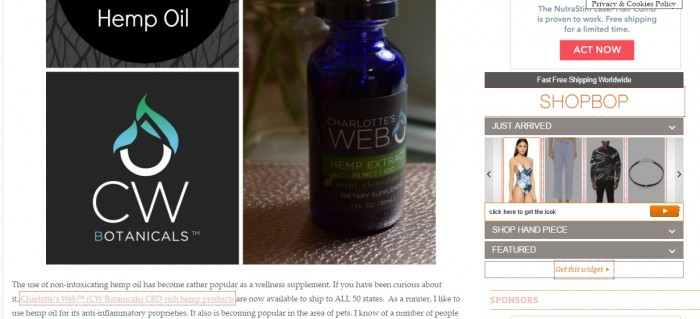
Before getting into fixes, here are some handy tools to see if links are showing as nofollow on a site. For Chrome you can get a nofollow links viewing extension. For Firefox, there is the NoDoFollow Extension. These will highlight nofollow links on a site. There are many of these types of extensions. I just linked to one example for each browser. The image below uses the Chrome extension and shows a red outline around my nofollow link and nofollow widget in the sidebar.
WordPress Plugin Fixes
There are a number of WordPress plugins that will allow you to nofollow all links on your site or selectively choose links to no follow. Here are a couple:
1) Outbound Link Manager: This is the plugin that I use. It allows you to select and add nofollow to links in bulk, which I love. But on the downside, it has not been updated in 2 years. So far I have not had compatibility issues with it though. Update: A person in a Facebook group expressed concern for security reasons about using an older plugin. I’m comfortable with this plugin, but obviously anyone who shares that concern should choose a different one. My only real concern with it is that if it quits working someday with a WordPress update, or if it did become insecure, that a new option would then have to be found to replace it since it does not write to the database and permanently change the links. So if deactivated, all those links become followed again.
Update: While it works well with my sites, one blogger has reported that this plugin did not nofollow everything correctly for her. So if you use it, be sure to check that it is indeed adding nofollow where you want it.
2) External Links: This plugin will allow you to set all links on your site to nofollow and then you can override that on individual links by adding an html tag. I have seen several experts that I trust recommend this plugin, including WpBeginner.
There are other plugins, so if these don’t work for you, do some browsing and test out some other ones.Let me know if you find one that you like and recommend!
Also, if you use Yoast’s WordPress SEO plugin, it includes an option to set a meta tag on posts that will tell Google to nofollow all links on that page. I still manually add it to the links though in case of a plugin failure and because some tools used by ad networks won’t show the links as nofollowed, and then they will end up contacting me asking me about that.
3) Use a Meta Tag: Finally, if you want to try a meta tag approach, you can code this into your header or header scripts area so that it appears on all pages of your site:
<meta name="robots" content="nofollow" /> That will tell Google not to follow any links on the page. This will effectively nofollow your entire site. There are various differing opinions on the wisdom of that, and I have seen it both recommended and not recommended. I’m not personally a fan of it, but have done it on sites I purchased where I could not vouch for the links and I saw no loss in traffic after doing so. I also know of a number of bloggers who have resorted to it as the most efficient way to deal with the problem. Note that viewing tools like the extensions that I linked to might still show the links as followed when a meta tag is used instead of an html tag.
Blogger Fixes
Blogger is a bit more difficult. I don’t use Blogger, so if anyone comes up with a great fix, let me know and I’ll add it here! A blogger in one of my groups found this article on adding nofollow to all links in Blogger. She tried it with some, but not total, success. Its method involves adding code to your blog, so make a backup before proceeding with it!
Aside from that, you have an option with links in Blogger to check a box to add rel=nofollow. But obviously that will still be quite a bit of effort if you have to manually comb through your entire site. You could also try adding the meta tag I listed above to your code in order the tell Google to nofollow all links.
After the Clean Up, Ask For Reconsideration
You likely got your manual action notice sent from Google Webmaster Tools, but Google has been known to find ways to notify people of penalties outside of a Webmaster Tools account. If you do not use Webmaster tools, get signed up (it is free and useful). Once you feel that you have taken care of the issue and nofollowed all unnatural links, use the option in your Webmaster Tools console to submit a request for reconsideration. Explain fully in your request what you did to address the problem. It normally takes a day or two (or three) and then Google will respond. (note, one commentator reports that it now takes a week or more)
Odds and Ends
Here are some miscellaneous topics that don’t fit well elsewhere in this article. I’ll add to them as things seem pertinent.
(1) What about JavaScript Widgets, such as Rewardstyle, Shopbop, etc? These are problematic, since in many cases you lack control over whether links in the script are set to nofollow. It has been shown that Google can crawl and follow links from JavaScript. I lack the knowledge tell if nofollowing all links on your site will also take care of this problem. I imagine using meta tags for all pages would work, but again, I am not certain. Ultimately, the best thing would be to get the companies using these widgets to be sure that nofollow is part of their own coding. That certainly is in their own best interests. As an aside, my Google ads do not show up as nofollow on my site. Go figure…. My Shopbop widget does show as nofollow though.
(2) If bloggers all nofollow all links, won’t this also make Google’s algorithm unreliable? Certainly an argument can be made that by pushing nofollow links, Google is slowly forcing people to nofollow everything, which seems counter-productive. An interesting discussion of the implications of this and the problems bloggers face in general can be read here.
(3) I have been asked if it is wise to nofollow everything on a site. I’m not personally a fan of that, but I have done so for the sake of convenience on some of my sites (usually ones that I purchased where I could not vouch for the source of the links). On others, such as this one, I nofollow nearly everything since many links are related to brands that I have a relationship with, but some truly and obviously natural links (such as the links in this article) I leave alone. I tend to nofollow all links to brands since I don’t trust Google to figure out that what I left alone were truly natural. I find that unfortunate, but it is what it is. There is plenty of debate about this out there, so if the idea of nofollowing everything interests or concerns you, do some searching, and you will find varying opinions on the topic.
(4) Please note that adding rel=nofollow to a link does not effect how the link works. If will still link properly, it will still track if it is an affiliate link etc. All the tag does is tell Google that it should not trust the link as an authority for purposes of how Google uses it in its search algorithm.
(5) What about Skimlinks? Services such as Skimlinks work by using script to redirect links. Because of this, their links will likely not get marked as nofollow by browser extensions that are used to check for that even if there is a nofollow in the redirect. Skimlinks states that they do indeed add a nofollow in the redirect. See here. Google should pick that up when it crawls and follows the redirect.
(6) What about site audits? In dealing with this, before requesting reconsideration, you certainly should carefully review your site and fix any issues. Go through your posts and make sure that you have diligently nofollowed all unnatural links. It can be easy to miss something. So take your time and do a careful review. This is something I think most bloggers are quite capable of doing themselves, just be sure to be thorough and question every link. My approach has always been that, when in doubt, I no follow it.
You Might Also Like
 For Bloggers: How To Make Disclosure Buttons For WordPress
 For Bloggers: How to Comply With The New FTC Guidance on Disclosing Products Provided For Review
  For Bloggers: BlogWorld Coupon Code, Early Registration Ends Thursday!
 Six Halloween Makeup and Costume Ideas
 Summer Beach Bag Essentials
 Glowing – nourishment, movement and transformation. The 2021 edition. Part 2
 L’Oreal Double Extension Beauty Tubes Mascara
 Products That Will Not Help You To Lose Weight
 Splendicity Contest for September 20, 2007
 Easy Fitness Fuel with Balance and a Birchbox Sweepstakes!
is there a way to add the no follow tag to a link without altering the html? Can I add nofollow to a basic weblink such as http://www.yourwebsite.com?
No follow is added to links using the html tag on the link. There isn’t a way to do it to individual links without altering the html.
You can also nofollow all the links on page by adding a meta tag to the code for that page. That is what the yoast plugin does.
So, I get the part about anything to a company needs to be nofollow, but what about social media links to YOUR pages/sites? Are they to be follow or nofollow?
And what about links to sites that you’re posting about on your own, like a school website or another personal blog? Are they to be follow or nofollow?
Great post. It’s so easy for bloggers to no know these days just how many ways you could accidentally be breaking the rules on outbound links. It’s a shame that the link spam community has driven the need for bloggers to be hyper aware of what they are putting on their blogs innocently in fear of being penalized by Google.
There should not be a need to nofollow links to your own social media or anything else that is a natural organic link (links to things you link to because you want to do so, not because you got something for it from someone else). It is links where you were compensated, or the link is intended to confer an SEO benefit that are of concern.
I agree, it is indeed a shame. So many are now nofollowing every single thing either out of convenience or out of fear. I have pretty much moved to nofollowing all links to brands, even for natural organic links, because I don’t trust Google to figure out what is natural and what is from a product I received for review.
FYI: I am looking through all of my code and it appears that SKIMLINKS is adding do follow links. I’m removing them from my site. But that could definitely explain how many of us got triggered for that email.
Thank you for all your help, Carleen. Outbound Link Manager added no follow to some links but ignored others . Sometimes it added it twice. For my Shopstyle links it added rel=nofollow between the “a” and “href” instead of after “target=”. I’ve gone thru 4 of 45 pages of posts so far. Very discouraging!
How can you see the Skimlinks links? Mine don’t seem to show up in my edit txt mode.
I put the chrome extension to show if links are no follow or do follow. No follow have a line around them. I viewed my blog and there were linked I hadn’t put there and they weren’t marked as no follow. So I removed Skimlinks and the links were gone. Ugh.
Links rather.
I think it’s utterly ridiculous (this is coming from the perspective of someone who’s got over 6 years’ of blog posts to wade through now, because I also got one of those warnings). If Google has the manpower to scour through all us hobby bloggers for violations, they’ve got the manpower to vet their own search engine additions and figure out what’s spam and what’s legitimate. I’m really just in a resentful snit about having to play by their rules, and all the work I have to do now. Not to mention, there are conflicting reports even in their own forums–Some say it’s ALL outbound links, others say it’s only for those where there’s the perception (real or imagined) that you’ve received compensation for said links. I would’ve thought the fact that we’re required to disclose payment/product by the FTC would be good enough, since that’s coming from the US gov’t, and Google is just a search engine, but obviously I’m wrong. Thank you for letting me rant a bit. 🙂
Agreed! To have to go through eight years of links and for them to not at least provide an easy way to figure out what is causing the problem? Utterly annoying. I have been pretty attentive at what I make “no follow”, so I’m pretty annoyed that something is still causing a problem. It’s a crushing blow to have to go through this and think of all the time I’m going to have to spend going through all of my links. Ugh!
Skimlinks states that they put nofollow in their redirect. http://support.skimlinks.com/entries/20394401-Does-Skimlinks-affect-SEO- Since the redirect does not trigger until the link is clicked, most of the nofollow checkers won’t show the links as nofollow. But Google will recognize them as nofollow when they crawl and follow the redirect.
You could try doing the metatag option. Put the tag in the portion of your theme for adding header scripts. This will no-follow every link on the site though.
Rant away! I feel for you. I also think that Google will end up forcing everyone to nofollow everything, which then starts making their search results inaccurate.
I don’t have that level of trust… I make a few cents on skimlinks. Skimlinks is one of the only things I can see that could have triggered that email. Otherwise, maybe 5 or 6 errors within 705 posts.
Do you often link to brands with do follow links? I suspect that Google is wrongly thinking that a lot of product reviews and store links and such are based on freebies from brands when they really are not. Anyway, I use Skimlinks extensively on 7 sites and none of them got the warning. I nofollow nearly everything on those sites, including all links to brands and stores even if they are natural links. But certainly if Skimlinks isn’t earning for you anyway, you might as well remove it just in case. Nothing to lose really by doing that.
Also, you can turn off skimwords, which auto adds links and keep Skimlinks, which monetizes existing links, and then make sure your existing links have the nofollow tag on them on your end.
Hello, my name is Casey Markee and I’m a recognized expert in the areas of Google Penalties, Site Auditing, and general SEO Consulting. I’ve personally audited 70+ food blogs, I’m the on-staff SEO expert for Food Blogger Pro and I’m a notable speaker with food blogger speaking credits including; Food Bloggers Canada, Camp Blogaway, and others.
I wanted to “clarify” some of the issues addressed above. First, these manual actions by Google are a DIRECT follow-up from their 3/11 statement warning bloggers that engaging in the practice of trading free products for reviews with links required you to do specific things…otherwise, you may get penalized.
The appropriate portion of the “link scheme” guidelines you should be aware is the following:
“Buying or selling links that pass PageRank. This includes exchanging money for links, or posts that contain links; exchanging goods or services for links; or sending someone a “free” product in exchange for them writing about it and including a link”
If you recognize these types of links on your site, Google requires food bloggers to note the following on the post:
– make sure you put a disclosure at the TOP and BOTTOM of the post that this is “sponsored or advertorial” in nature or note any dispensation involved
– make sure ALL links to the sponsor or outside site is NOFOLLOW
– make sure that the post “ads value” to the user—that means it’s high-quality, and unique at a minimum.
These current penalties are “Unnatural Links from your Site” manual actions. These will ONLY BE DELIVERED IN YOUR GOOGLE SEARCH CONSOLE. If you don’t have a notice in there under your Manual Action Viewer, you do not have this penalty.
To unwind this penalty you will need to thoroughly audit your site and add a nofollow tag to any external link on your site within a post that you either received a product, sample, or some other form of renumeration for. This link could be to a “app page” a “product page” the sponsor’s “home page” or even one of their “social profiles.”
I would urge all of you to focus on your PREVIOUS SPONSORED POSTS. Make sure that if you linked out at all to another site or their social account or their app, that all those links are nofollowed. That’s really the main focus with this action and what they emphasized in their 3/11 notice (this is not a coincidence).
Personally, I don’t believe SkimLinks is a trigger for this round of actions. My data doesn’t support that. But I also think they give out TERRIBLE advice and that all affiliate links, including SkimLinks, should be nofollowed by default. There is no such thing as a “good” affiliate link. All of them should be nofollowed, that’s the best practice.
Next, it’s also a good idea to make sure your graphic network/advertising/influencer badges are also NOFOLLOWED. Badges on your site that advertise you are a “BlogHer Influencer” or that “You have Massive Sway” or that you are a member of Advertising Network, those are honestly paid in nature. If you weren’t a member of these networks (and getting paid) you wouldn’t have the badge on your site and would not be linking to these ad networks. The best practice is to NOFOLLOW those badges.
Same goes with blog round-ups and link parties. Yes, these links are reciprocal in nature. No, that doesn’t mean that they are automatically against Google guidelines. Links MUST have an editorial component. There has to be a gatekeeper there that says “yeah or nay” for a link. In many cases, blog round-up and link party links can meet this requirement. But you need to be aware they “could be a risk for you.” I just don’t find any evidence those are related to this round of notices….at this time.
Why do I say that?
I’ve got dozens of food bloggers right now that have tons of link party links…none of them received a notice. I currently track 80+ different sites in my Google Search Console at any one time….over 30 of them are food blogs currently. None of them, have received one of these new round of Manual Actions.
Next, I would not suggest you NOFOLLOW all links on a page, via a page-level robots tag. That’s very poor advice. Google wants you to link out. It’s good for users. It’s good for the Internet. They just want you to understand that not ALL links have a natural “editorial consideration.”
Also, please understand that when you submit a reconsideration request, you are not going to receive a response in 1-3 days. What you will receive as an initial note saying “hey, we have received your reconsideration request and are reviewing it” notification. Then, around 7-10 days in the future (on-average) you will receive a response. But 1-3 days is not a realistic number.
Finally, it’s worth noting that the chances of these penalties being FALSE POSITIVES are incredibly low. All Manual Actions are reviewed by an actual person. 100% of them. These were sent out intentionally because a problem was detected.
As someone who actually unwinds penalties professionally, I’d be happy to answer any clarifications or questions as they arise. But my best advice if you have received this Manual Action is to focus less on your “ads” and more on your “sponsored, advertorial, freebie, and giveaways” specific type content.
Great info which echos most of what I already wrote. Thanks.
I would like to clarify that I tend to agree with you about not nofollowing all links on a site via meta tags. However, I am seeing that be the preference among many bloggers who find that it is the only efficient way to clean up their site, especially if they use Blogger, which does not allow for plugins to easily do so. I have done so myself on sites that I have purchased for the sake of convenience.
I do think too that there are some false positives with this. Perhaps not many, but certainly some. In one of the groups I am in multiple bloggers received this latest action who already nofollow everything on their sites. I also know of a few very diligent bloggers who have combed their sites and are sure they missed nothing. It makes sense that there would be some false positives. Among product review bloggers imagine the circumstance where Google knows that a huge blogger outreach was done and notes that many bloggers did not nofollow the links. Well, the few bloggers who wrote about the product naturally could get caught up in that. It is another reason why I’m seeing a lot of bloggers essentially over do it with nofollow, including myself. I nofollow all links to brands. Is that ideal? No. Is it a convenient way to avoid problems? Yes.
As for reconsideration requests, I personally have routinely seen responses to reconsideration requests in about 2 days. I don’t think I have ever seen one go a week, although it has been a year or so since I have dealt with one for anyone, so perhaps Google has slowed down.
First, Google itself admits that the chance of getting a false positive on manual actions is “virtually zero.”
This is direct quote from former Google spam fighter, Murat Yatagan and that statement was given in an interview recorded with Barry over at SERoundtable last week. Here’s the link to the article: https://www.seroundtable.com/why-do-some-google-manual-actions-seem-automated-21899.html
I’m sure “anything is possible.” But that has not been my experience and I see no evidence to support this is happening right now. I would certainly advise all food bloggers who receive any manual action to take them very seriously.
Next, if you have personally known of a few “diligent bloggers” who have combed their sites and are sure they missed nothing. Then most likely, they are wrong. I just did an audit with a food blogger who was absolutely sure she got all her “sponsored posts” updated with the new disclosure recommendations with Google. She missed seven posts.
Next, it’s certainly possible that a recon request review could take take two days (for things like a hacked site or a straight up denial) but that is no where near the norm and it’s just not correct information in the current environment.
Google help is littered with threads of site owners who are still waiting for weeks after submitting a recon request. The average response is 7-10 days and it can take weeks if the penalty in question is links-based.
Finally, if you are affected by a manual action and fire back a reconsideration request in 1-2 days without really doing a thorough review of your site or investigating the causes of the penalty that will do more harm than good. So please take your time in doing a FULL AUDIT of your website or hiring a professional to do one for you.
I agree with you that any blogger who receives a manual action notice should take it very seriously and take appropriate action. I have not suggested otherwise, nor would I. I do find interesting though that I know of 5 bloggers now who got this recent unnatural outbound links notice who already nofollow their entire sites, although of course, in the interest of diligence, they should go and make sure that is really the case. I did look over one of their sites briefly and their site-wide meta tag showed on all pages that I checked. Another couple I know who are quite knowledgeable on the topic are unable to find anything after fully auditing their sites. Of course that doesn’t mean that they or
other bloggers should somehow not take the matter seriously or not recheck their work. I just found those circumstances interesting and worthy of noting.
Anyway, thanks again for your comments.
Google is starting to look like the big banks. We old time bloggers made them, now they try to crucify and manipulate us. Where would google be if it weren’t for us?! this sucks and i find it personally appalling.
Thank you so much for the information. It makes the most sense out of any other notices I have seen. I got the notice and as an eight year Blogger veteran, I”m a bit overwhelmed at all the work I now have ahead of me. I have always set out to use nofollow links for sponsored material, but I am not above admitting that I may have missed a few. My quick solution was to set all my sponsored posts back to draft status. As I go through and check each one, I can re-publish. It will take a while, since blogging is not my full-time job, nor do I make actual money from doing it. It will be a slow process, but I guess you gotta do what you gotta do.
I like your idea of unpublishing and then republishing all of the sponsored posts as you go through them.
I’m also considering scrapping some really old ones that are irrelevant now.
ack this is SO helpful! i had no idea how to go through and do this so THANK YOU!
Got the email on Friday, from Sunday through today I went through all 3100 posts on blogger and manually did them. It was good because I removed links from shops that were no longer around and even deleted some posts and cleaned up my blog a lot. And now it loads faster too! I filed for reconsideration today!
I did the same thing. I have had my blog for 7 years now and went from 3100 posts to just under 2100…. things before pinterest, sponsored posts, things that people probably don’t google (smaller companies and such), and shops that are now closed down. I started on Sunday and just finished today, one page at a time.
I got this notification too. I fixed it all in two days, over 600 posts, and I’m still waiting for my reconsideration to be approved. I wish I saw this article first. It would have saved hours and hours of stress.
You can do it!! (And hopefully, so can I!)
I received the Google penalty as well. Courtney Phyrra told me about your post about this. I was able to detect about 20 super old links (2-3 years that is) that weren’t no-follow on my blog with the help of SEOQuake (I’m on blogger). I made them no-follow and appealed and YAY it got approved on Monday! So all good again! 🙂
Received this manual action message from Google around one week back. In just last 2 months my google search traffic dropped by more than 80%! No followed all links on guest posts and sponsored posts and submitted my reconsideration request today. Hoping for the best, keeping my fingers crossed!